The 1994 Five String Electric Bass Guitar

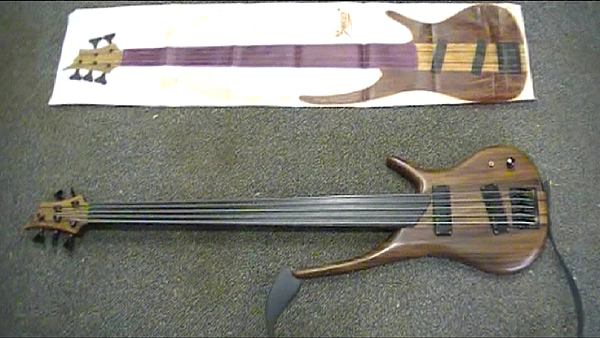
This weeks project is a retro look at a five string electric bass guitar I built in 1994. I documented the project in photos and put them into an album. I thought it would be interesting to make a Ken Burns style video with these photos using the two axis camera dolly from hack #7.

Back in 1994 I was living in Hawaii on the island of Maui. I was into RC airplanes and woodworking at the time, and I had just started playing the bass guitar. I wanted my own bass and, being the DIY person that I am, decided to build my own. I chose to make it a five string because that extra low B note is big and round, and it allowed bass lines below E.

The first order of business was to find some wood. I found a local man that had a sawmill and he sold local grown woods already cut into cured planks. I chose Monkey Pod for the front body wings, Tropical Almond for the back body wings and Golden Ponsiena for the neck. I chose Purple Heart for the fingerboard because of its hardness and density which closely resembled Ebony.

Now that I had a selection of wood, it was time to start designing my new bass. I did a few sketches and then went to work on a scale drawing in pencil on drafting paper, old school style. I didn’t have a PC or internet access back then. I still use pencil and paper a lot to this day to draw up plans and shop drawings. I like it’s simplicity. After about a week of drawing and design changes I had a final plan. The next step would be to do a full scale color rendering of my new bass to see how the woods would look together. I used some water color markers for this and soon had a nice full color picture to hang on the wall and look at. I liked it. Now it was time to get started with the build.

At this point I’ll let the video and photos tell you the rest of the story about the construction. I love this instrument! It’s become a part of me, an extension of my musical expression and I plan on playing it for years to come.

Enjoy the video, and keep on hackin!
Posted in Weekly Hacks | 1 Comment

The Propeller Development Robot

This week I decided it was time to do a project with the Parallax Propeller chip. I’d heard all kinds of good things about this MCU and since I have all these Roomba parts laying around my shop I figured it was time to build another robot. I wanted a robot platform that I could experiment with. One that could easily have other sensors added in the future. I had a Propeller MSR1 control board on hand which is perfectly suited to this purpose with it’s 24 IO pins and on board h-bridge. I also had an extra Parallax PING sensor to mount on my robot and a couple of those wonderful Roomba drive motors to move the thing. Next I needed a chassis to mount everything to. I had a plastic enclosure leftover from the Laser Ranger Finder project that was perfect. Now that all my parts were gathered together, it was time to get building.

When I build a thing I usually just sit down with my parts and brainstorm for a while. I come up with ideas, think them through and change them as the design comes forth. Being willing to change the path you’re on with design is important. I try to let the function dictate the form. So, after some time I came up with a way to mount the motors to the enclosure and use the enclosure’s top to mount the control board and sensors to. This would allow easy access for future mods to be added. My choice for batteries was eight AA rechargeables simply because I had them on hand. They would go inside the enclosure and help keep the center of gravity down low which would add stability. At the rear I installed a tail wheel from a Roomba which is designed with two wheel tank steering in mind.

Once everything was together it was time to get some code and upload it. After a crash course in SPIN from my friend Roy Eltham, I had some standard motor drive and sensor code going. It was time to test. There was, of course, a bug. There’s always something to troubleshoot… that’s hackin! The problem was in the sensor part of the robot. It would seem to trigger a turn in direction even though there wasn’t an object in the way. Strange. I checked code, wiring, connectors, I even raised the PING sensor up on the bolt that you see in the final design, but none of this worked. I decided to look at the specs for the PING and noticed that an example schematic had a 1K resistor in series on the signal wire! Aha! I installed this resistor and suddenly, the robot was working perfectly. It was an impedance matching issue.

This was my first time using the Propeller chip and I have to say that I love it! It’s a very powerful MCU. I’m very pleased with the ease of use of the programming language to alter the robot’s behavior. I’m sure you’ll be seeing more projects from me that put it to use.

Until then… keep on hackin!

Posted in Weekly Hacks | 4 Comments

The Laser Range Finder – Beta Testing

I was fortunate enough to be selected as a beta tester for Joe Grand’s latest invention for Parallax, the Laser Range Finder Module.
Below you will find a link to the Arduino code I used.

The module consist of a red laser and a very small camera. It emits a pulse, grabs a frame and calculates the distance to the reflected laser dot. It has four interface pins. Power, ground and two serial communication lines. Sending the command ‘R’ will tell the module to take a reading and send the data back.

I decided to test mine on an Arduino and build a setup that could be mounted to the back of my vehicle as a backup proximity warning device. Something that would readout the distance on a dash mounted LCD and sound an audible warning below a given threshold. I had a 16 x 4 reflective LCD on hand from Element 14 that I needed to review anyway so I used that as my readout display. I got some help with the Arduino code from my friend Roy Eltham. He was a great help in this project so here’s a shout out to Roy! “Thank You!”

Breadboarding the project took a couple hours and after uploading and tweaking some code, it worked! I could get readings as close as 150 mm and as far as 2.4 meters! It was time to put it all in some enclosures. I found two plastic projects boxes at Radio Shack that suited my needs and set to work. After about 8 hours of build time over two evenings it was complete. The Laser Range Finder (LRF) was in one box and the Arduino and LCD were in another, The two were linked via a length of twisted pair CAT5 cable. I hardwired to the LRF and put an RJ-45 connector on the main display box. With the help of some 3m two sided mounting tape I attached everything to the vehicle and I was ready to test!

The first thing I tried was backing up to my white garage door. It was mid day so it was very bright outside. This would be a good test of blob detection. The bright light would make it more difficult to find the bright spot from the laser. This was a beta test after all. Why not test the boundaries. I started out about one meter from the door, turned the unit on and got a reading of 0000 which meant that it couldn’t find the blob. So, I slowly backed up and at 547mm it showed a reading. It was evident that the bright light was hindering blob detection.

So, what to do? I remembered from my photo experience that a filter might help. Since the laser is emitting red light, how about a red filter? The camera would see everything in shades of red and the laser dot just might stand out as the brightest. I had covered the LRF box with a piece of clear acrylic. I removed it and with a red Sharpie marker, colored both sides red on the half that covered the camera and left the laser side clear. I installed the acrylic and went back to testing. I started out at about one meter again, turned the unit on and YES! I had a reading! The red filter worked. I slowly moved the car forward and I was able to get distance readings all the way out to 2.3 meters. Success!! The LRF also has a command to adjust the exposure to current lighting conditions. This is done by sending ‘E’ to the LRF. I implemented this in the code and it also helped with blob detection outdoors.

This is a great piece of hardware. Joe really did his homework on this one, and it will only get better before final release in the next month or two on the Parallax website. I can see this being used on robots as a distance sensor, which a few beta testers have indeed done. I plan on using it on another robot project in the near future as a forward looking edge sensor.

Great job Joe Grand! Thanks for letting me beta test!

Keep On Hackin…

Click here for the Arduino code

Posted in Weekly Hacks | 10 Comments

The All Terrain Robot from Roomba parts

Roombas! What a cool robot! They work quite well right up until the wheel encoder sensors get dirty, then they drive around in circles. Poor robot… then they get cast aside as being “glitched”.

Well, they’re usually ok and just need a good cleaning. I’ve posted a couple of videos on that subject on my other youtube channel.
Roomba teardown part one
Roomba Teardown part two

You can find Roombas on ebay pretty cheap. They’re a great source of parts to build your own robots from. The motors have a lot of torque thanks to a well engineered planetary gear transmission and as mentioned, they even have wheel rotation encoders. The main board has two H-bridges that can be used by simply tapping into the switching transistors with a PWM signal from your favorite micro controller.

I first built a four wheeled rocker bogie suspension equipped rover robot last year and posted a video of it on www.dinofab.com. This week, I’ve revisited that robot and made a few mods. It now has an all aluminum chassis and two heim joints on the cross link of the suspension. I took this to Maker Faire North Carolina this weekend and it performed quite well.

So here’s this week’s hack video. Get on ebay and find yourself a Roomba to hack!

Keep On Hackin!

Posted in Weekly Hacks | Comments Off on The All Terrain Robot from Roomba parts

The WALL-E Robot

A few weeks ago I found a WALL-E toy robot at a yard sale for $1. I bought it thinking it would be cool to put a couple motors and a micro controller in it to create a cute little autonomous robot.

The first challenge was finding a couple of motors that I could hack into it. I had some motors, with gear reduction built in, left over from some Rumble Robots. After a couple hours of hardware hacking, I managed to get them installed driving the two separate tracks. Next I need some sensors and what better place to put them than in those cute little binocular eyes WALL-E has! I figured that a Parallax PING ultrasonic sensor would work so I removed the sensor drivers from the PCB and installed them in the eyes. I used the existing wires that were there for the LEDs to get the signal down to the body where I connected them to the PBC. Unfortunately, in the process of removing the drivers I damaged the PCB. My solution was to solder the wires to another PING sensor and then block the signal from their on board drivers by mounting it against a wall inside the body. It worked! Problem solved. It now had motors and a sensor.

Next came the H-bridge that was required to drive the motors. I decided to build one myself with some transistors I had salvaged from a Roomba Robot main board. I bread boarded the circuit up and it worked first try! Great! Then I transferred the whole circuit to a perfboard and it also worked! Now I had a way to drive the motors. Next came the installation of the micro controller. I connected the Arduino and the H-bridge to the motors and wired everything up. After uploading some code I gave it a test on the bench and it worked fine. Now all I had to do was finish putting the battery and everything inside the body and I would be finished.

Enter the Gremlins…..
For reasons I could not figure out, the H-bridge failed. It had one set of transistors that simply refused to work. This meant that one of my motors would not run in reverse. After a few hours of troubleshooting I gave it up and called it a day… 11 hours at the bench is enough!

The next morning I looked over the H-bridge some more. I replaced a few transistors but it still refused to work. OK, time for plan B. In true hardware hacker form, I made a trip to the Dollar Store in search of some kind of RC toy that had motors that went forward and reverse. Why? Because inside that toy would be an H-bridge to hack into my robot! Well I scored two RC cars for $5 each. Perfect! I brought them home and opened them up. Sure enough, there were my hackable H-bridges. After a bit more hardware hacking I had them installed. That took care of that Gremlin!

Oh but there’s always another Gremlin… they come in pairs I think.
My motors weren’t spinning up right. They would start to spin then stop. Very odd. As I was working this problem I was on an IRC chat on Savage Circuits and a buddy there, Roy Eltham, reminded me that I needed to give the motors their own power supply separate from the Arduino. DUH! I was so frazzled at this point in the build that I didn’t even think of this very obvious fact! So I added another 9v battery. Now the motors had one and the Arduino had one. Success!! It finally worked!!

Thanks for the reminder Roy. 🙂

This project took a lot longer than I EVER had estimated!! Thanks to the Gremlins it was the first one since I’ve been doing a Hack A Week that went past my deadline by two full days! In the end, I learned a thing or two and made it all work.

Enjoy the video, and Keep On Hackin!

Posted in Weekly Hacks | 1 Comment